7 Red Flags in a Phishing Email Every SME Owner Should Know
Phishing emails hit Indian SMEs every day. Here are 7 red flags your team should know to stop email fraud before it costs you lakhs.
Phishing emails are responsible for over 80 percent of all cyber attacks against Indian businesses. They impersonate banks, government agencies, courier companies, and even your own colleagues. The good news is that phishing emails almost always leave behind clues.
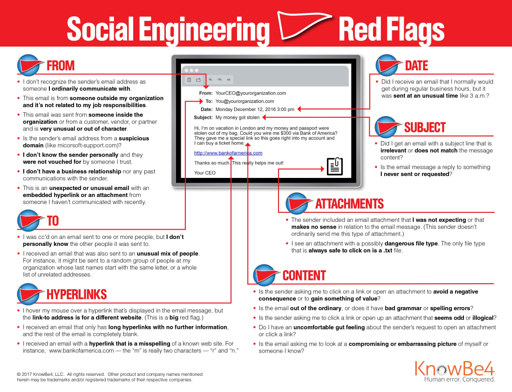
Here are 7 red flags that expose a phishing email before you click anything.
1. The Sender Email Address Does Not Match the Display Name
A phishing email might display the name State Bank of India but the actual sending address is sbi-alert@gmail.com or sbi.in.support@outlook.com. Always click on the sender name to expand and see the full email address. If it does not end in the official domain (e.g. @sbi.co.in), it is phishing.
2. Urgent or Threatening Subject Lines
Phishing emails are engineered to trigger panic. Subject lines like Your account will be suspended in 24 hours, Immediate action required, or Legal notice attached are classic manipulation tactics. Legitimate organisations do not create artificial urgency to force immediate clicks.
3. Generic Greetings Instead of Your Name
Real banks and government portals address you by your registered name or account number. Phishing emails say Dear Customer, Dear User, or Dear Account Holder. If a communication claims to be from your bank but does not know your name, treat it as suspicious.
4. Suspicious Links That Do Not Match the Claimed Domain
Hover your mouse over any link in the email (do not click) and look at the URL shown in the bottom of your browser. If you see a long, strange URL or one with a different domain than the one claimed (e.g. the email says HDFC Bank but the link goes to hdfc-secure-login.xyz), it is a phishing link.
5. Unexpected Attachments Asking You to Enable Macros
If an email you were not expecting contains a Word, Excel, or PDF attachment and asks you to Enable Content or Enable Macros to view it, close it immediately. This is one of the most common malware delivery methods used against Indian SMEs.
6. Requests for OTP, Password, or Bank Details via Email
No legitimate bank, government agency, or business platform will ever ask you to reply to an email with your OTP, password, Aadhaar number, or bank account details. If an email asks for any of these, it is a scam regardless of how official it looks.
7. Mismatched Branding, Logos, or Spelling Errors
Phishing emails often use slightly distorted logos, wrong brand colours, or contain spelling and grammar errors. They may also use low-resolution images or inconsistent fonts. Real enterprises maintain strict brand standards in all communications.
Bonus Tip: Use ScamShield AI
If you receive a suspicious email, paste the sender address or email content into ScamShield AI. Our phishing detection engine analyses the email against known fraud patterns and gives you an instant risk score, so you never have to guess.
Conclusion
Phishing emails are getting more convincing every year with AI-generated content. But they always leave clues. Train your team to spot these 7 red flags and use ScamShield AI as your safety net for every suspicious email your business receives.