AI Is Now Writing the Invoice: How Finance Teams Can Stop Deepfake Payment Fraud
AI-generated emails, invoices and deepfake CEO calls are targeting finance teams. Use this practical control checklist to stop payment fraud before approval.
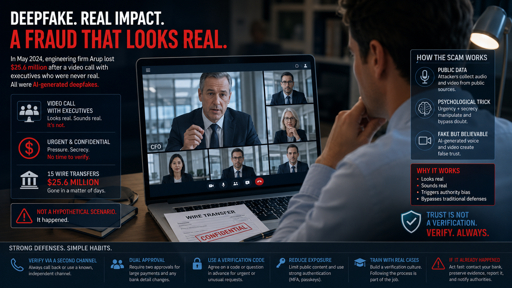
Your CFO sends a WhatsApp voice note:
“I am in a board meeting. Approve the vendor payment today. Do not discuss it with anyone.”
The voice sounds exactly like your CFO.
The message references the correct vendor.
The invoice looks genuine.
The email thread includes a realistic conversation between the “CFO” and the supplier.
But it may all be AI-generated.
Attackers now use generative AI to create convincing executive emails, fabricated invoices, realistic email threads and cloned voices. Microsoft has documented an AI-assisted business email compromise campaign that impersonated CEOs and used fabricated invoices to convince accounts-payable teams to process payments.
The new rule for finance teams: A perfect email, a familiar voice or a realistic video call is not approval. Verification is approval.
Why This Is a Trending B2B Risk
AI has removed the old warning signs.
Earlier, fraud emails often had spelling mistakes, strange formatting or poor grammar.
Now, AI can create:
- Emails in your CFO’s writing style
- Invoices matching your vendor’s format
- Realistic email threads
- Cloned executive voices
- Deepfake video calls
- Urgent payment instructions
- Fake “updated bank details” requests
VIPRE research cited by security teams found that 40% of detected BEC emails are now AI-generated.
This matters most for:
- CFOs and finance heads
- Accounts-payable teams
- Treasury teams
- Procurement leaders
- Founders and directors
- CA firms handling client payments
- Exporters and MSMEs
The AI Payment-Fraud Playbook
Step 1: The attacker studies your business
They collect information from:
- Company websites
- Press releases
- Public invoices
- Email breaches
- Compromised vendor mailboxes
- Social media
- Supplier communication threads
They identify the CFO, finance manager, AP executive and likely vendor.
Step 2: They create a believable request
AI helps them write an email that sounds like your CFO or supplier.
It may include:
- Correct invoice number
- Correct vendor name
- Correct payment amount
- Realistic internal language
- A forwarded email thread
- An attached invoice
- A deadline
Microsoft reported attackers using impersonation domains, executive-themed payment requests, fabricated invoices and fake supporting conversations to persuade finance personnel to initiate transfers.
Step 3: They add urgency and secrecy
The message says:
text
This is confidential.

Do not discuss with anyone.

Approve before the payment run closes.

I am unavailable on call.
Urgency plus secrecy is a major fraud signal.
Step 4: They use a cloned voice or video
A finance employee may receive a call or video call from someone who appears to be the CEO, CFO or director.
The “executive” may instruct them to approve a transfer or change vendor bank details.
A widely reported deepfake video-call case involved a multinational company losing about US$25.6 million after an employee authorised 15 transfers following a fake video meeting.hindi.ianslive
Step 5: Money leaves the company
The employee approves the payment.
The money reaches a mule account.
By the time the real CFO or vendor is contacted, recovery may be difficult.
6 Controls That Stop AI Payment Fraud
1. Treat every payment change as unverified
Any request to:
- Change bank details
- Add a new payee
- Redirect a payment
- Approve an urgent transfer
- Bypass normal approval
must be treated as unverified by default.
This applies even when the request appears to come from the CEO, CFO or a known vendor.cyberclan
2. Require out-of-band verification
Do not verify using the same channel used for the request.
If the request came by email, call the known number.
If it came by WhatsApp, call the executive’s known office number.
If it came by voice call, verify through an internal approved channel.
A voice or video approval should never, by itself, satisfy a high-value payment control.ringsafe
3. Use maker-checker approval
Require two independent people for:
- New vendor onboarding
- Bank-detail changes
- High-value payments
- Urgent payments
- First-time payments
- Overseas payments
This prevents one deceived employee from moving company funds alone.igrs
4. Lock down vendor-master changes
Restrict who can change:
- Bank account number
- IFSC code
- Beneficiary name
- Payment instructions
- Vendor contact details
Maintain a change log showing who requested, verified, approved and implemented the change.
5. Add a cooling-off period
For a new bank account or high-risk vendor change, hold the first payment for a defined review period.
This gives finance teams time to detect anomalies before funds leave the company.
6. Train finance teams on AI fraud
Teach AP, treasury and procurement teams that:
- A flawless email is not proof
- A familiar voice is not proof
- A video call is not proof
- Urgency is not proof
- Secrecy is a warning sign
- They are allowed to slow down and verify
The 60-Second AI Fraud Check
Before approving any payment, ask:
- Did the request arrive through an unusual channel?
- Is it urgent or confidential?
- Does it ask to bypass normal approval?
- Does it involve a new bank account or payment instruction?
- Has it been verified through a separate trusted channel?
- Has a second authorised person approved it?
If the answer to any question is uncertain, pause the payment.
How ScamShield AI Helps
ScamShield AI helps finance, procurement and AP teams review suspicious communications before payment approval.
Forward a suspicious:
- Supplier email
- Invoice
- GST notice
- WhatsApp payment request
- CEO payment instruction
- Vendor bank-change request
ScamShield AI helps identify impersonation signals and fraud patterns, giving your finance team a documented pay-or-stop assessment before money moves.
Before you approve, verify. Forward the suspicious email, invoice or payment request to ScamShield AI.
FAQ
Can AI really create a convincing CEO email or invoice?
Yes. Generative AI can create executive-style emails, realistic email threads, fabricated invoices and cloned voices. Microsoft has documented AI-assisted BEC campaigns using executive impersonation and fake invoices to target finance teams.
Is a video call from the CFO enough approval?
No. A video call or voice call should never be the only control for a high-value payment. Use out-of-band verification and dual authorisation.ringsafe
What is the biggest red flag in AI payment fraud?
Urgency combined with secrecy. If someone says “approve now” and “do not tell anyone,” pause and verify independently.guard
How can ScamShield AI help?
ScamShield AI helps review suspicious supplier emails, invoices, GST notices, WhatsApp payment requests and executive payment instructions before they enter your payment-approval workflow.
Final Takeaway
AI has made fraud look professional.
But your controls should not depend on spotting a bad email.
They should depend on a strong process:
No payment change is approved without independent verification and dual authorisation.
That is how finance teams stop AI-powered fraud before money leaves the company.