
Fake Courier Delivery Scam in India: 7 Safety Tips Before You Click or Pay
Fake courier messages may claim your parcel is delayed, your address needs updating, or a small delivery fee is pending. Learn seven simple checks to avoid phishing links, card theft and UPI fraud in India.
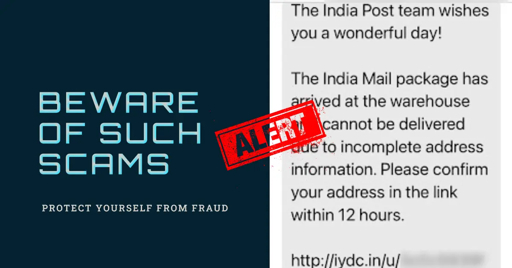
You receive an SMS, WhatsApp message, or email saying:
“Your parcel delivery has failed. Pay ₹25 to reschedule delivery.”
Or:
“Your package is held because the address is incomplete. Update it now.”
The message may use the name of India Post, a courier company, an online shopping platform, or a familiar delivery brand. It may even arrive when you are genuinely waiting for a parcel.
But the link can be fake.
A fake courier delivery scam is a phishing attempt where criminals impersonate courier services or delivery platforms to steal your card details, UPI PIN, OTP, bank credentials, or personal information. The message usually asks you to click a link, pay a small fee, confirm an address, or contact a fake customer-care number.bajajgeneralinsurance
+2
The safest rule is:
Do not click a delivery link from an unexpected message. Open the official shopping or courier app yourself and check the tracking status there.
What Does a Fake Courier Message Look Like?
Fake courier messages often use urgency and a small payment amount.
Examples include:
textYour parcel could not be delivered.
Pay ₹25 to reschedule your delivery.

Your address is incomplete.
Update now to avoid return of the parcel.

Your package is held at the warehouse.
Pay a small delivery charge today.

Delivery failed. Confirm your location within 2 hours.

Your parcel is waiting. Click to track now.
The fraudster wants you to think:
text“It is only ₹10 or ₹25.”
“I am expecting a parcel anyway.”
“I need to act quickly.”
But the small payment request is often only the first step. A fake page may collect your card number, CVV, OTP, UPI PIN, online-banking password, address, or mobile number.bajajgeneralinsurance
+1
Tip 1: Never Click Delivery Links in Unexpected Messages
A scammer can send delivery messages through:
- SMS
- Facebook Messenger
- Telegram
- Fake advertisements
- Random mobile numbers
Even if the message uses a courier-company name or logo, do not assume the link is real.
Instead:
- Open the shopping app where you placed the order.
- Check your order history.
- Open the official courier website manually.
- Enter the tracking number yourself.
- Use only support contact details shown on the official website or application.
Security guidance recommends manually checking the delivery status through the official courier website or retailer app instead of clicking links in SMS, WhatsApp or email messages.quickheal
+1
Tip 2: Treat a Small “Delivery Fee” as a Warning Sign
Fraudsters often ask for a small amount:
text₹2
₹5
₹10
₹15
₹25
₹50
The amount is intentionally small. They hope you will not think carefully before entering payment details.
But a real courier company should not ask you to enter sensitive banking details through an unexpected SMS link.
India Post has warned that it does not ask people to update delivery addresses or make payments through SMS links.facebook
+1
If you see a message asking for a small redelivery fee, do not pay through the link. Verify the delivery directly through the official app or website.
Tip 3: Check Whether You Actually Ordered Anything
Before reacting to a parcel message, ask:
textDid I place an order?
Which platform did I use?
Which courier is delivering it?
Do I have a real tracking number?
Does the order show a delivery issue inside the official app?
If you cannot find the order in your shopping history, treat the message as suspicious.
Do not assume that a message is real because it arrives during festival sales, birthdays, weddings, online-shopping seasons, or when you are expecting another parcel.
Tip 4: Check the Sender and Link Carefully
A fake delivery message may come from:
- A random mobile number
- A personal WhatsApp number
- An unfamiliar email address
- A misspelled sender name
- A suspicious website domain
Look for warning signs such as:
textindia-post-delivery-help.example
delhivery-track-now.example
courier-payment-update.example
parcel-reschedule.example
delivery-support-247.example
A genuine company website usually uses its official domain. Do not trust a link simply because it contains words such as “India Post,” “courier,” “delivery,” “track,” or “support.”
On a computer, hover over a link without clicking to inspect the destination. On a phone, it is safer not to open the link at all.
Tip 5: Never Share OTP, UPI PIN, Card Details or CVV
No courier company needs your:
- OTP
- UPI PIN
- ATM PIN
- Card PIN
- CVV
- Internet-banking password
- Debit-card number through a suspicious link
- Credit-card details through a random SMS
- Screen-sharing access
- Remote access to your phone
Remember:
You do not need to enter your UPI PIN to receive a refund, delivery update, cashback or parcel confirmation.
Your UPI PIN authorises a payment from your account. Never share it with anyone.
Courier-scam guidance specifically warns users not to provide OTPs, UPI PINs, card details, net-banking passwords or full banking information through delivery links or messages.quickheal
+1
Tip 6: Do Not Call the Number in the Message
A fake courier message may include a number such as:
textFor support, call 1800-XXX-XXXX
Contact delivery executive now
Call customer care immediately
This may connect you to the scammer.
The caller may say:
“Install this app so I can update your delivery address.”
“Share your screen so I can process the delivery.”
“Enter your UPI PIN to confirm your parcel.”
“Share the OTP to cancel the payment.”
Do not follow these instructions.
Find the courier company’s support number through:
- Its official website
- Its verified mobile application
- Your original shopping order
- A verified social-media profile
- The official courier receipt
Never use the number provided in an unexpected SMS, WhatsApp message or email.
Tip 7: Report and Delete Suspicious Delivery Messages
If you receive a suspicious courier message:
- Do not click the link.
- Do not reply.
- Do not call the number in the message.
- Take a screenshot for evidence.
- Report the message as spam or phishing.
- Block the sender.
- Delete the message after saving evidence.
If you entered banking details or lost money:
- Contact your bank immediately using its official helpline.
- Block cards, UPI access or online banking if your bank advises it.
- Call India’s National Cyber Crime Helpline: 1930.
- File a complaint at:
texthttps://cybercrime.gov.in
- Save screenshots, links, sender numbers, payment receipts and transaction IDs.
Prompt reporting is important because it may help your bank and authorities act faster on a suspicious transaction.quickheal
+1
Example: A ₹25 Delivery Fee Trap
Imagine you receive this message:
textIndia Post: Your parcel is at our warehouse.

Your address is incomplete.
Please pay ₹25 to update delivery details.

Click here: parcel-update.example
A safe response is:
textDo not click the link.

Open the official shopping app and check whether the parcel exists.

If the order is real, use the tracking number on the official courier website.

If you cannot find a matching order, block and report the message.
The message may look urgent, but it does not deserve an urgent payment.
Quick Checklist: Before You Pay a Delivery Fee
text□ I confirmed that I actually placed an order.

□ I checked the order inside the official shopping app.

□ I did not click a link from SMS, WhatsApp or email.

□ I opened the courier website manually.

□ I checked the sender number or email address.

□ I did not share my OTP, UPI PIN, CVV or password.

□ I did not install an APK or unknown app.

□ I did not share my screen with a caller.

□ I will report the message if it looks suspicious.
Hindi Safety Tip
फर्जी कूरियर मैसेज से कैसे बचें
textअगर आपको पार्सल, कूरियर या डिलीवरी के नाम पर SMS, WhatsApp या ईमेल मिले,
तो उसमें दिए गए लिंक पर तुरंत क्लिक न करें।

₹10, ₹25 या ₹50 की डिलीवरी फीस मांगने वाला मैसेज भी फ्रॉड हो सकता है।

ऑर्डर की जानकारी हमेशा Amazon, Flipkart, Meesho या कूरियर कंपनी की
ऑफिशियल ऐप या वेबसाइट पर जाकर जांचें।

OTP, UPI PIN, CVV या बैंक पासवर्ड कभी किसी को न दें।

पैसे कट जाएं तो तुरंत 1930 पर कॉल करें और cybercrime.gov.in पर शिकायत करें।
Gujarati Safety Tip
ફેક કુરિયર મેસેજથી કેવી રીતે બચવું
textકુરિયર, પાર્સલ અથવા ડિલિવરીના નામે મળેલી SMS, WhatsApp કે ઈમેલ લિંક પર
તરત ક્લિક ન કરો.

₹10, ₹25 અથવા ₹50 ની ડિલિવરી ફી માંગતો મેસેજ પણ ફ્રોડ હોઈ શકે છે.

ઓર્ડરની માહિતી હંમેશા Amazon, Flipkart, Meesho અથવા કુરિયર કંપનીની
સત્તાવાર એપ કે વેબસાઇટમાં તપાસો.

OTP, UPI PIN, CVV અથવા બેંક પાસવર્ડ ક્યારેય કોઈને આપશો નહીં.

પૈસા કપાઈ જાય તો તરત 1930 પર કૉલ કરો અને cybercrime.gov.in પર ફરિયાદ કરો.
How ScamShield AI Helps
ScamShield AI helps individuals and businesses check suspicious digital content before they act.
You can use ScamShield AI to review:
- Courier SMS messages
- Delivery emails
- WhatsApp payment requests
- Suspicious tracking links
- Refund messages
- QR codes
- UPI payment requests
- Fake customer-care communications
- APK download prompts
- Payment screenshots
ScamShield AI can help identify warning signs in a suspicious message, link, screenshot or payment request. It should support—not replace—safe habits such as independent verification.
Frequently Asked Questions
Is a courier message asking for a ₹25 delivery fee real?
It may be fraudulent, especially if it arrives unexpectedly and asks you to click a link or share payment details. Verify your delivery inside the official shopping app or by entering the tracking number on the courier’s official website.bajajgeneralinsurance
Does India Post ask people to update addresses through SMS links?
India Post has warned that it does not ask people to update addresses or make payments through SMS links. Treat such messages as suspicious and do not click the link.facebook
What should I do if I clicked a fake courier link?
Close the website, do not enter details, do not download files, and run a device-security scan. If you entered bank, card, UPI or password details, contact your bank immediately and call 1930 if financial fraud is involved.
Can a courier company ask for my OTP or UPI PIN?
No. Do not share OTPs, UPI PINs, CVV details, banking passwords or screen access with anyone claiming to represent a courier company.quickheal
How do I check if my parcel message is genuine?
Open the shopping app where you placed the order or type the courier’s official website address into your browser. Use the tracking number there. Do not use the link or phone number provided in the message.quickheal
How do I report a fake courier scam in India?
Take screenshots, contact your bank if money or details were shared, call 1930, and submit a complaint at cybercrime.gov.in.cyberkannadigs
Final Takeaway
A fake courier message tries to make you act fast.
It may use a familiar brand name.
It may mention a real-looking parcel.
It may ask for only ₹10 or ₹25.
It may say your delivery will be cancelled.
But a small payment link can lead to a much bigger loss.
Before you click, remember:
Check the parcel in the official app. Never pay from an SMS link.