How To Verify a Supplier GSTIN Before Payment: 5-Step Checklist for Indian SMEs
Before adding a supplier to your vendor master or releasing payment, verify their GSTIN status, legal name, invoice details and filing history. Here is a 5-step checklist.
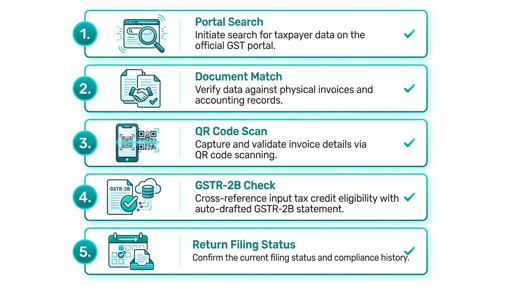
Your accounts team receives a supplier invoice.
The GSTIN looks valid.
The invoice amount matches the purchase order.
The supplier name is familiar.
But before you add the vendor to your master or release payment, verify the GSTIN.
A cancelled, suspended or mismatched supplier GSTIN can create ITC risk, compliance issues and payment-fraud exposure. Businesses should verify supplier GSTIN status, legal name, address and filing history before processing invoices or claiming input tax credit.
Rule: A GSTIN on an invoice is not verification. Verify it on the official GST portal before payment.
Why This Matters for SMEs and CA Firms
This is a high-intent task for:
- SME owners approving payments
- Accounts-payable executives
- Procurement teams onboarding vendors
- CA firms reviewing client invoices
- Finance teams claiming input tax credit
- Businesses handling new suppliers
A supplier may send an invoice with a GSTIN that is inactive, cancelled, mismatched or linked to a different business. If your team processes it without checking, you may face ITC reversal, GST notice risk or payment fraud.
The official GST portal allows taxpayers to search supplier details using GSTIN or PAN.
The 5-Step Supplier GSTIN Checklist
Use this before:
- Onboarding a new supplier
- Processing a first invoice
- Releasing a high-value payment
- Claiming ITC
- Updating supplier bank details
- Responding to a GST notice
Step 1: Open the official GST portal
Go directly to:
text
https://www.gst.gov.in
Do not use a link from an email, WhatsApp message or invoice.
On the GST portal, select:
text
Search Taxpayer → Search by GSTIN/UIN
Enter the supplier’s 15-character GSTIN, complete the captcha and click Search.
Step 2: Check GSTIN status
The portal should show the supplier’s registration status.
Check whether it says:
StatusWhat it meansActionActiveRegistration is validProceed only after other checksSuspendedCancellation proceedings may be pendingHold payment and investigateCancelledRegistration has endedDo not process invoices dated after cancellationProvisional / MigratedRegistration may need further reviewInvestigate before payment
An active GSTIN is necessary for a supplier to issue valid tax invoices, but it is not the only check.
Step 3: Match legal name and invoice details
Compare the GST portal result with the invoice.
Check:
- Legal name of business
- Trade name
- GSTIN
- State code
- Registered address
- Invoice date
- Invoice number
- Tax rate
- HSN/SAC code
- Total invoice value
The legal name on the GST portal should match the supplier entity name on the invoice. Small differences such as “Pvt Ltd” versus “Private Limited” may be acceptable, but a completely different business name is a red flag.
Also check that the supplier’s registration date is before the invoice date. An invoice dated before the supplier’s GST registration can create ITC problems.
Step 4: Check return-filing history
On the GST portal, open the supplier’s filing table and review recent GSTR-1 and GSTR-3B filings.
A supplier with an active GSTIN but poor or missing filing history may create ITC risk.
The GST portal allows taxpayers to view return-filing details for a selected financial year after searching a GSTIN.
For higher-risk suppliers, also reconcile the invoice against GSTR-2B before claiming ITC.
Step 5: Record the verification
Save the verification evidence in your vendor master or AP system.
Record:
- Supplier name
- GSTIN
- Verification date
- GST portal status
- Legal name match
- Invoice number
- Verified by
- Approved by
- Screenshot or reference number
- Next review date
This creates an audit trail and helps your team detect later changes in supplier status.
7 Red Flags Before Payment
Pause the invoice if you see:
- GSTIN status is suspended or cancelled.
- Legal name on GST portal does not match the invoice.
- Invoice date is before supplier registration date.
- GSTIN state code does not match the supplier’s registered state.
- Supplier is a composition taxpayer but issues a tax invoice.
- Invoice has missing HSN/SAC, incorrect tax rate or mismatched totals.
- The supplier asks you to update bank details along with the invoice.
A composition taxpayer cannot issue a tax invoice or collect GST; they issue a bill of supply.
What To Do If the GSTIN Is Suspended or Cancelled
Do not release payment immediately.
Instead:
- Pause the invoice.
- Contact the supplier using a trusted, independently stored phone number.
- Ask for clarification and updated registration documents.
- Inform your CA or tax adviser.
- Check whether the invoice falls before or after the cancellation date.
- Update your vendor-master status.
- Escalate if the supplier cannot provide a valid explanation.
Invoices issued after cancellation generally do not support ITC claims.
How ScamShield AI Helps
ScamShield AI helps SMEs and CA firms review suspicious supplier invoices, GST notices, emails, links, UPI IDs and payment screenshots before payment.
Forward the supplier invoice, GSTIN, suspicious email or payment request to ScamShield AI.
ScamShield AI helps identify fraud signals and gives your finance team a fast pay-or-stop risk assessment before the vendor master is updated or payment is released.
Before you add a supplier or release payment, check the GSTIN and invoice with ScamShield AI.
FAQ
How do I verify a supplier GSTIN in India?
Go to the official GST portal, select Search Taxpayer → Search by GSTIN/UIN, enter the supplier’s GSTIN and captcha, then review status, legal name, registration date and filing history.
Should I verify GSTIN before every payment?
At minimum, verify GSTIN during vendor onboarding, first invoice, high-value payment, supplier bank-detail change and before claiming ITC. Re-verify periodically for active suppliers.
What GSTIN status is safe for payment?
An Active GSTIN is the baseline requirement, but you should still match the legal name, invoice details, registration date and filing history before payment.
Can I claim ITC if supplier GSTIN is cancelled?
Generally, invoices issued after cancellation do not support ITC. Hold the payment and consult your CA or tax adviser before proceeding.