KYC Update Scam in India: Don’t Click “Your Bank Account Will Be Blocked” Messages
Fake KYC messages use threats such as “Your account will be blocked today” to steal OTPs, UPI PINs, banking details and identity information. Learn how to spot KYC fraud and verify updates safely.
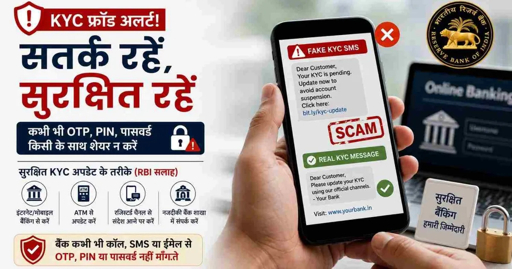
You receive an SMS, WhatsApp message, email, or call saying:
“Your KYC has expired. Update it today or your bank account will be blocked.”
The message may use the name of your bank, UPI app, mobile company, credit-card provider, wallet, insurance company, PAN service, or government service.
It may look urgent. It may include a link. It may ask you to call a number. It may tell you to install an app. It may even arrive when you are genuinely due for a KYC update.
But it could be a scam.
A KYC update scam is a fraud in which criminals impersonate a bank, financial company, telecom provider, wallet or government-related service and falsely claim that your Know Your Customer details are incomplete, expired, or invalid. Their goal is to make you click a phishing link, install a malicious APK, share an OTP, reveal a UPI PIN, provide card details, or give remote access to your phone.
The safest rule: Never update KYC through a link, phone number, APK file, or WhatsApp message sent unexpectedly. Use only your bank’s official mobile app, official website, branch, or the support number printed on your debit or credit card.
What Is KYC?
KYC means Know Your Customer.
Banks and financial institutions use KYC to verify a customer’s identity and address. This process helps prevent fraud, money laundering and misuse of financial accounts.
A genuine KYC update may involve documents such as:
- PAN card
- Aadhaar card
- Address proof
- Photograph
- Identity document
- Business registration document
- GST-related information for business accounts
However, a genuine KYC requirement does not mean every KYC message is genuine.
Scammers rely on the fact that most people know KYC is a real banking process. They use that trust to create fear and urgency.
What Does a Fake KYC Message Look Like?
A fake KYC message may say:
text
Your KYC is expired. Update immediately to avoid account blockage.

Your bank account will be suspended today due to incomplete KYC.

Your UPI account will be disabled within 24 hours.

Complete video KYC now to avoid service interruption.

Your PAN-Aadhaar KYC verification is pending.

Click here to update your details.

Download the KYC app to verify your account.

Call customer care immediately to prevent account closure.
The message may come through:
- SMS
- Phone call
- Telegram
- Facebook or Instagram advertisement
- Google search advertisement
- Fake customer-care website
- Social-media direct message
The language may be English, Hindi, Gujarati, Hinglish, or a mix of languages.
The KYC Scam Path: How It Works
Step 1: The fraudster creates fear
The message says your bank account, SIM card, credit card, UPI access, wallet, or service may be blocked.
Common pressure phrases include:
text
Update today.
Action required immediately.
Your account will be blocked.
KYC expired.
Final warning.
Avoid service suspension.
Complete verification now.
The purpose is to stop you from thinking calmly.
Step 2: The fraudster sends a link or app file
The message may include:
- A suspicious website link
- A fake bank login page
- A WhatsApp link
- A QR code
- An APK download
- A fake video-KYC application
- A phone number for “customer care”
The link may look similar to a real bank or company website but have extra words, spelling changes, hyphens, numbers or unfamiliar endings.
Example:
text
Looks genuine:
yourbank.com

Possible fake versions:
yourbank-kyc-update.example
yourbank-secure-login.example
kyc-yourbank-verify.example
yourbank-update-now.example
Step 3: The fake page asks for sensitive information
A fake KYC website may ask for:
- Customer ID
- Mobile number
- PAN card number
- Aadhaar details
- Debit-card number
- CVV
- ATM PIN
- OTP
- UPI PIN
- Internet-banking password
- Email password
- Card expiry date
A scammer may also ask you to share your screen or install a “KYC update” app.
Step 4: The fraudster steals money or takes over your account
Once the criminal has enough information, they may:
- Access your online-banking account
- Register a new UPI device
- Reset passwords
- Steal OTPs
- Transfer money
- Apply for credit using your identity
- Contact your family or customers
- Use your phone for more fraud
- Sell or misuse your personal information
8 Warning Signs of a KYC Update Scam
1. The message creates immediate fear
Be careful when you see:
text
Account blocked today
Last warning
Update within 30 minutes
Your SIM will be disconnected
Your UPI will stop working
A genuine bank may send reminders, but an unexpected threat should make you verify through an official channel.
2. The sender asks you to click an unknown link
Do not click links in KYC messages received by SMS, WhatsApp, email or social media.
Open your bank’s official app or type the bank’s website address manually in your browser.
3. You are asked to install an APK file
A fake KYC update may ask you to install files with names such as:
text
KYC_Update.apk
Bank_Verification.apk
Video_KYC.apk
Secure_Banking.apk
Account_Update.apk
Do not install unexpected APK files. A malicious APK may read SMS messages, capture OTPs, access notifications, misuse accessibility permissions, or display fake banking screens.
4. The caller asks for your OTP or UPI PIN
No bank employee needs your OTP, ATM PIN, UPI PIN, CVV, card PIN, internet-banking password or email password to update KYC.
Your UPI PIN is used to approve money leaving your account. You never need it to receive money, update KYC, process a refund or prevent account blockage.
5. The caller asks you to share your screen
A fake customer-care agent may ask you to install a remote-access app or share your screen.
Screen sharing can expose:
- Bank balances
- OTPs
- UPI apps
- Account numbers
- Passwords
- SMS alerts
- Personal messages
- QR codes
Do not share your screen with unknown callers.
6. The message comes from a random number or personal email
A genuine bank generally uses official communication channels. Be cautious if the message arrives from:
- A random 10-digit mobile number
- An unknown WhatsApp account
- A Gmail, Yahoo or other free email address
- A poorly spelled email domain
- An account without verified business information
7. The message asks you to pay a fee
A scammer may claim you must pay a small “KYC processing fee,” “verification charge,” “reactivation fee,” or “account-unblock charge.”
Do not pay through UPI, QR code, payment link or bank transfer unless you independently verify the request using official channels.
8. The fraudster tells you not to visit a branch or contact the bank
Be suspicious if someone says:
text
Do not call the bank.
Do not tell anyone.
Do not visit the branch.
I will complete the KYC from here.
Keep the call connected.
A genuine bank will not stop you from verifying the request.
How to Update KYC Safely
If you receive a KYC reminder and believe it may be genuine, use only one of these methods:
Option 1: Use your official bank app
Open the banking app you normally use.
Do not use a link received in a message.
Check whether the app itself shows a KYC update notification.
Option 2: Visit the official bank website
Type the website address manually or use a browser bookmark you have already saved.
Do not search for “bank customer care” and click the first advertisement or unknown result.
Option 3: Visit your bank branch
For a major KYC concern, visiting your bank branch is one of the safest options.
Carry only the documents requested by your bank.
Option 4: Call the number on your bank card
Use the customer-care number printed on the back of your debit or credit card.
Do not call a number from a suspicious SMS, WhatsApp message or email.
What to Do If You Clicked a Fake KYC Link
If you clicked but did not enter any information
- Close the page immediately.
- Do not download files or install apps.
- Do not enter your bank details.
- Run a security scan on your phone or computer.
- Check your bank and UPI apps for unusual activity.
- Change your password if you are concerned that it may have been exposed.
- Enable multi-factor authentication where available.
If you entered your password, OTP, card details or UPI PIN
- Contact your bank immediately using the official helpline.
- Ask the bank to secure or block affected cards, UPI access and online-banking sessions.
- Change your banking and email passwords from a clean device.
- Remove unknown apps from your phone.
- Check your UPI transaction history and bank statement.
- Call India’s National Cyber Crime Helpline:
text
1930
- File a complaint at:
text
https://cybercrime.gov.in
- Save all evidence: messages, links, numbers, screenshots, transaction IDs and APK-file names.
The 30-Second KYC Safety Check
Before responding to any KYC message, ask:
text
1. Did I expect this message?

2. Is the sender using an official bank or company channel?

3. Is the message creating panic or urgency?

4. Is it asking me to click a link, install an app or call an unknown number?

5. Is it asking for OTP, UPI PIN, CVV, password or screen sharing?

6. Can I verify this directly in the official app, website or branch?

7. Would I still act if the message did not say “urgent”?
If the answer to any question feels unsafe, stop and verify independently.
Safety Rules for Businesses and Employees
KYC scams can also target business accounts.
A scammer may impersonate:
- Your bank
- GST department
- Payment gateway
- UPI provider
- Business-loan provider
- Accounting platform
- Payment aggregator
- Vendor or supplier
- Digital-signature provider
For business accounts:
- Never share company banking credentials over phone, WhatsApp or email.
- Use separate devices for business banking where possible.
- Require two approvals for large payments.
- Do not install APK files on phones used for business banking.
- Verify any bank-detail change by calling the known contact.
- Train staff to report suspicious KYC messages quickly.
- Use official websites and apps only.
- Keep invoices, payment records and account documents organised.
Hindi: KYC फ्रॉड से कैसे बचें
text
अगर आपको बैंक, UPI, SIM या वॉलेट के नाम पर
“KYC अपडेट करें, नहीं तो अकाउंट ब्लॉक हो जाएगा” का मैसेज मिले,
तो उसमें दिए गए लिंक पर क्लिक न करें।

किसी भी व्यक्ति को OTP, UPI PIN, ATM PIN, CVV,
बैंक पासवर्ड या स्क्रीन शेयरिंग एक्सेस न दें।

KYC की जानकारी केवल बैंक की आधिकारिक ऐप,
ऑफिशियल वेबसाइट, बैंक ब्रांच या डेबिट कार्ड पर दिए गए
कस्टमर केयर नंबर से जांचें।

अगर पैसे कट जाएं, तो तुरंत 1930 पर कॉल करें
और cybercrime.gov.in पर शिकायत करें।
Gujarati: KYC ફ્રોડથી કેવી રીતે બચવું
text
જો તમને બેંક, UPI, SIM અથવા વૉલેટના નામે
“KYC અપડેટ કરો, નહીં તો એકાઉન્ટ બ્લોક થઈ જશે” એવો મેસેજ મળે,
તો તેમાં આપેલી લિંક પર ક્લિક ન કરો.

OTP, UPI PIN, ATM PIN, CVV, બેંક પાસવર્ડ
અથવા સ્ક્રીન શેરિંગ એક્સેસ ક્યારેય કોઈને આપશો નહીં.

KYCની માહિતી ફક્ત બેંકની સત્તાવાર એપ,
ઓફિશિયલ વેબસાઇટ, બેંક બ્રાન્ચ અથવા ડેબિટ કાર્ડ પર આપેલા
કસ્ટમર કેર નંબરથી જ ચકાસો.

પૈસા કપાઈ જાય તો તરત 1930 પર કૉલ કરો
અને cybercrime.gov.in પર ફરિયાદ કરો.
How ScamShield AI Helps
ScamShield AI can help you review suspicious messages before you click, download, reply or pay.
Use ScamShield AI to assess:
- Fake KYC SMS messages
- Bank-account blockage alerts
- WhatsApp KYC requests
- Suspicious bank links
- APK download prompts
- Fake customer-care messages
- QR codes and payment requests
- UPI-related scams
- Email attachments
- Fake government or compliance notices
ScamShield AI can help identify warning signals, but it should support—not replace—official verification.
Use the official app. Use the official website. Use the official bank number. Never trust urgency alone.
Frequently Asked Questions
What is a KYC update scam?
A KYC update scam is a fraud in which criminals pretend to be from a bank, wallet, telecom company or financial service and claim your KYC has expired. They try to make you click malicious links, install APK files, share OTPs or provide banking information.
Can my bank account be blocked if I do not click a KYC SMS link?
Do not rely on the SMS link to find out. If you receive a KYC message, open your official bank app, visit the bank website manually, visit a branch or call the number on your debit card to verify whether action is actually required.
Should I share my OTP for KYC verification?
No. Never share OTPs, UPI PINs, ATM PINs, CVVs, banking passwords or screen-sharing access with anyone claiming to perform KYC verification.
Is it safe to download a KYC APK file?
No. Do not install unexpected APK files sent through WhatsApp, SMS, social media or email. Use only apps from official app stores and banking applications you already trust.
What should I do if I clicked a fake KYC link?
Close the site, do not enter any information, check your bank and UPI apps, and run a security scan. If you entered banking details or suspect financial fraud, contact your bank immediately, call 1930 and report the incident at cybercrime.gov.in.
How can I update KYC safely?
Use your official bank application, manually type the bank’s official website, visit a bank branch, or call the official number printed on your bank card.
Final Takeaway
A real KYC update does not need fear, panic or secrecy.
If someone tells you:
text
Update now.
Your account will be blocked.
Install this app.
Share your OTP.
Enter your UPI PIN.
Stop.
Do not click.
Do not download.
Do not share.
Verify through your bank’s official app, website, branch or card number.
A KYC message can wait. Your bank security cannot.