Vendor Bank Account Change Fraud: How Finance Teams Can Stop Payment Diversion Before Money Leaves
A routine “our bank details have changed” email can redirect every future supplier payment to a fraudster. Learn the red flags, verification controls and approval process finance teams need.
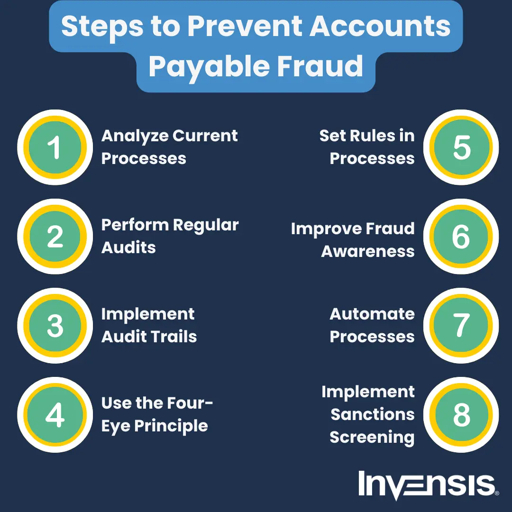
Your accounts-payable team receives an email from a long-standing supplier:
“Please note our bank details have changed. Kindly update your records and process the pending invoice to the new account.”
The email uses the supplier’s usual name.
The signature looks correct.
The invoice number matches an open purchase order.
The attached bank letter appears official.
Everything looks normal.
But the email may have come from a compromised supplier mailbox, a lookalike domain, or a fraudster who has monitored your email thread.
If your AP team updates the vendor master and releases payment, the money may go to a criminal account—not your supplier.
This is vendor bank-account-change fraud, also called payment-diversion fraud, invoice-redirection fraud or supplier impersonation fraud. It is one of the highest-risk B2B payment frauds because a single fraudulent change can redirect not only the current invoice, but every future payment to that vendor.
The golden rule: Treat every supplier bank-detail change as unverified until your finance team confirms it through a trusted, independently stored contact channel—not by replying to the email.
Why This Is a Board-Level Payment Risk
Vendor payment fraud does not look like a consumer scam.
It usually begins with a routine business process:
- A supplier invoice is due
- A vendor sends updated banking details
- Accounts payable updates the vendor master
- Finance releases the payment
- Money reaches the wrong account
The fraudster does not need to break into your bank account.
They only need to convince one employee that the supplier’s bank details have changed.
Vendor and invoice fraud occurs when criminals manipulate billing or payment instructions to divert money—often using a compromised mailbox, impersonating address or copied correspondence.
For a CFO, this creates four risks:
- Direct financial loss
- Supplier relationship damage
- Audit and internal-control failure
- Regulatory, insurance and reputational exposure
How Vendor Bank Account Change Fraud Works
Step 1: The attacker identifies an active payment
The fraudster may monitor a compromised supplier mailbox, intercept an email thread, or study publicly available information about your company and suppliers.
They look for:
- Open invoices
- Upcoming payment dates
- Purchase orders
- Vendor names
- Finance-team contacts
- Payment-run schedules
- Supplier email formats
- GST and invoice details
Invoice-redirection attacks often exploit the routine payment cycle: the attacker sends “updated bank account details” shortly before a genuine invoice is due.
Step 2: The attacker sends a believable bank-change request
The request may arrive from:
- The supplier’s real, compromised email address
- A lookalike domain, such as
supplier.co.ininstead ofsupplier.com - A free email address claiming to be a finance contact
- A reply-all thread that appears legitimate
- A WhatsApp message from a number claiming to be the supplier
The message may say:
text
Our bank has changed.

Please update our account details before processing Invoice INV-2451.

Attached is the confirmation letter from our bank.
Step 3: The attacker provides “proof”
The fraudster may attach:
- A fake bank letter
- A cancelled cheque
- A GST invoice
- A company letterhead
- A board resolution
- A KYC document
- A payment confirmation
- A screenshot of an email thread
These documents can make the request look credible, but none of them independently proves that the supplier actually made the request.
Step 4: Your AP team updates the vendor master
If the AP executive accepts the email as genuine, they may:
- Change the beneficiary account
- Change the IFSC code
- Change the bank name
- Save the new account in the vendor master
- Release the pending invoice for payment
Step 5: Payment is diverted
The payment is sent to the fraudster’s account.
Because the vendor master now contains the fraudulent bank details, future payments may also be diverted unless the change is detected and reversed.
9 Red Flags in a Vendor Bank-Change Email
Your finance and procurement teams should treat a request as high risk if they see any of these signs:
- The bank details changed shortly before a payment due date.
- The email comes from a new or slightly different domain.
- The sender asks you not to call the old contact.
- The request creates urgency: “Process before today’s payment run.”
- The email asks you to reply only to a new email address.
- The attached bank letter has formatting errors, mismatched details or unclear verification information.
- The supplier contact is unfamiliar or newly added.
- The request comes through WhatsApp rather than an approved vendor channel.
- The supplier cannot be reached on the phone number already stored in your vendor master.
A strong control is to treat every bank-detail change as fraud until a verbal callback on a number already present in the vendor master confirms it.
The 5-Step Vendor Bank-Change Verification Process
Use this process for every supplier bank-detail change, regardless of invoice value.
Step 1: Pause the change
Do not update the vendor master immediately.
Place the vendor in a “bank-change verification pending” status.
Pause payments to that vendor until verification is complete.
A practical control is to ensure that any bank-change request enters a pending-verification state and payments to that vendor pause automatically.
Step 2: Verify through an independent channel
Call the supplier using a phone number already stored in your approved vendor record.
Do not use:
- The phone number in the suspicious email
- The number on the newly attached invoice
- The number in the email signature
- A WhatsApp number provided in the request
Use an independently established contact channel: the number already on file, a previously verified source, or the supplier’s official website.trustpair
Step 3: Confirm with a known authorised contact
Speak to a known finance, accounts or procurement contact at the supplier.
Ask them to confirm:
- Whether they requested the change
- The exact bank name
- The account number
- The IFSC code
- The authorised signatory
- The reason for the change
- Whether the email and attachment came from them
The callback should be made by someone other than the person who initiated or approved the request.
Step 4: Record the verification evidence
Maintain a vendor bank-change register containing:
- Vendor name and vendor code
- Date of request
- Requested bank details
- Name of person who made the request
- Name of person who verified it
- Phone number called
- Source of that phone number
- Date and time of verification
- Approval evidence
- Supporting documents
- Final decision: approved or rejected
This evidence is essential for internal audit, fraud investigation and cyber-insurance documentation.stampli
Step 5: Apply maker-checker approval
No single employee should be able to change a supplier’s bank account and release payment.
Use dual authorisation:
- Maker: AP executive records the verified change
- Checker: Finance manager or controller independently approves it
- Payment releaser: A separate authorised person releases payment
This maker-checker control ensures that one persuaded employee cannot move company money alone.
AP Controls Every CFO Should Implement
1. Restrict vendor-master access
Only trained, authorised users should be able to edit:
- Bank account number
- IFSC code
- Beneficiary name
- Payment instructions
- Vendor contact details
2. Separate duties
Separate these roles:
- Vendor onboarding
- Bank-detail change
- Invoice approval
- Payment processing
- Payment release
- Bank reconciliation
3. Maintain a bank-change register
Every change should have a documented audit trail.
The register should show who requested, verified, approved and implemented the change.
4. Add a cooling-off period
For a newly changed bank account, consider holding the first payment for a defined review period.
This gives your team time to detect anomalies before funds leave the company.
5. Review high-risk changes
Escalate changes where:
- The vendor is new
- The amount is high
- The request is urgent
- The email domain is new
- The contact is unfamiliar
- The payment is international
- The supplier relationship is inactive
What To Do If You Already Paid a Fraudster
Act within hours, not days.
Step 1: Stop further payments
Do not release any additional payments on the affected vendor thread.
Step 2: Contact your bank immediately
Ask your bank to attempt a recall or freeze request on the fraudulent transfer.
The window to reverse a fraudulent transfer can be measured in hours, not days.
Step 3: Preserve evidence
Do not delete the email.
Preserve:
- Full email headers
- Attachments
- WhatsApp messages
- Invoice copies
- Vendor-master change logs
- Payment instructions
- Bank transaction details
- Internal approvals
Step 4: Notify internal stakeholders
Inform:
- CFO
- Finance controller
- Internal audit
- Legal team
- IT security team
- Procurement owner
- Cyber-insurance broker or insurer, if applicable
Step 5: Report the incident
If fraud is confirmed, report through:
text
Call 1930
And file a complaint at:
text
https://cybercrime.gov.in
CERT-In incident-reporting obligations may also apply to qualifying cyber incidents, depending on the organisation and incident type.
How ScamShield AI Helps Finance Teams
ScamShield AI helps finance, procurement and AP teams review suspicious supplier communications before payment approval.
Use ScamShield AI to assess:
- Supplier bank-change emails
- Invoice-redirection attempts
- Lookalike supplier domains
- Fake invoices and payment requests
- GST notices
- Vendor onboarding documents
- WhatsApp payment instructions
- CEO or CFO payment requests
- Suspicious email threads and attachments
ScamShield AI can help identify impersonation and fraud signals, but it should not replace your mandatory callback and dual-approval controls.
Before your AP team changes a vendor’s bank details, forward the supplier email, invoice or bank-change request to ScamShield AI for a pay-or-stop fraud assessment.
Frequently Asked Questions
What is vendor bank account change fraud?
Vendor bank-account-change fraud is a B2B payment fraud in which criminals impersonate a supplier and ask a company to update the supplier’s bank details. If the company updates its vendor master and pays, funds are diverted to the fraudster.
Is a supplier invoice or bank letter enough proof?
No. Invoices, bank letters, cancelled cheques and PDFs can be forged or sent from a compromised mailbox. Always verify through a trusted contact channel already stored in your vendor master.stampli
What is an out-of-band verification callback?
It is an outbound call to a trusted, independently sourced phone number to confirm that the supplier genuinely requested a bank-detail change. Never use a phone number supplied in the suspicious email, invoice or attachment.trustpair
Should small businesses also use dual approval?
Yes. Even a small finance team should require a second authorised person to approve bank-detail changes and payment releases. This prevents one employee from being socially engineered into moving money alone.iibf
What should we do after a fraudulent vendor payment?
Stop further payments, contact your bank immediately for a recall attempt, preserve the full email thread and payment evidence, notify internal stakeholders, and report through 1930 and cybercrime.gov.in.
How can ScamShield AI help prevent this fraud?
ScamShield AI helps review suspicious supplier emails, invoices, GST notices, WhatsApp payment requests and bank-change communications before they enter the vendor-master or payment-approval workflow. It supports fraud detection but should be used alongside callback verification and maker-checker approval.
Final Takeaway
A supplier email is not verification.
A PDF bank letter is not verification.
A WhatsApp confirmation is not verification.
A matching invoice number is not verification.
No supplier bank-detail change should be saved or paid against until it is verified through a trusted, independently stored contact channel and approved by a second authorised person.
For finance teams, this is not just an IT issue.
It is a payment-control issue, an audit issue and a board-level fraud-risk issue.